
这段代码实现了一个动态的天气开关组件,通过CSS的伪元素、过渡效果和SVG图标,增强了视觉效果和用户交互体验。
大家复制代码时,可能会因格式转换出现错乱,导致样式失效。建议先少量复制代码进行测试,若未能解决问题,私信回复源码两字,我会发送完整的压缩包给你。
演示效果
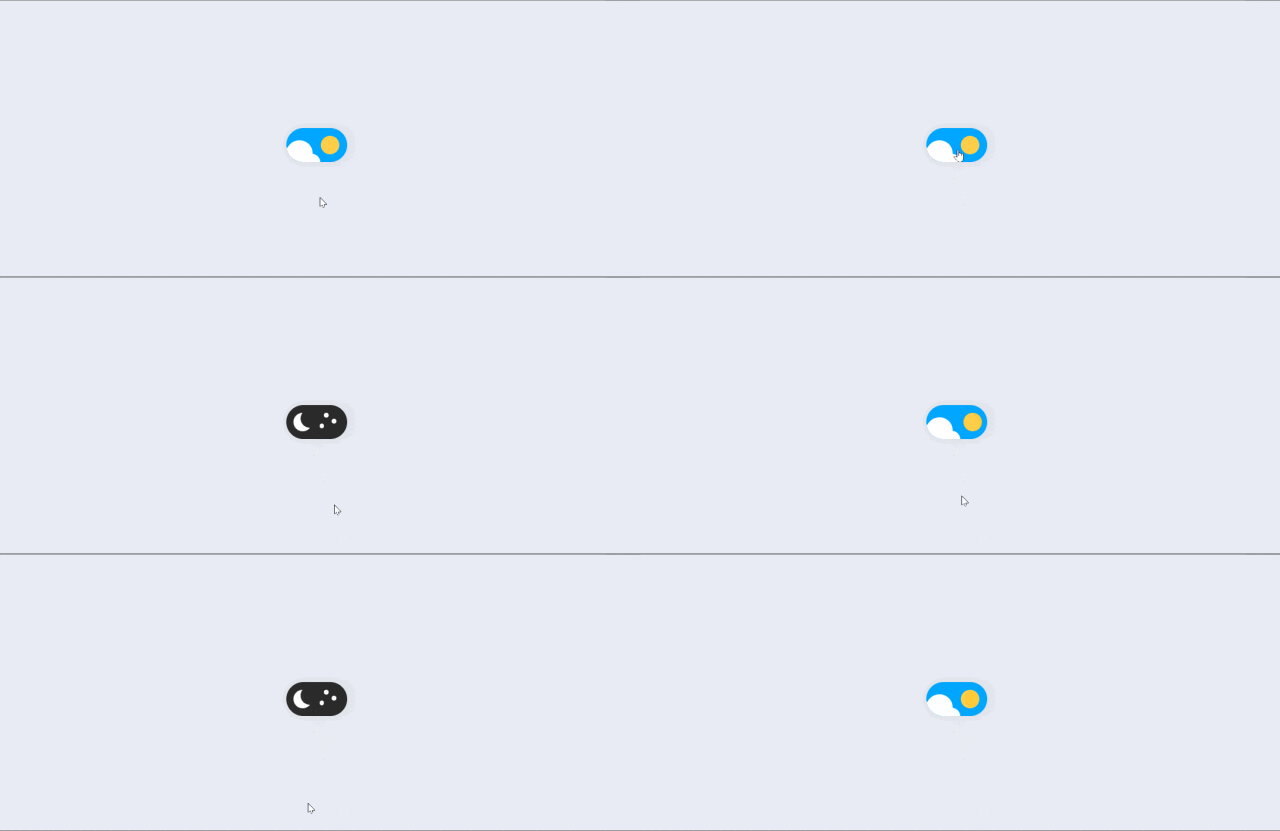
HTML&CSS
<!DOCTYPE html>
<html lang="en">

<head>
    <meta charset="UTF-8">
    <meta name="viewport" content="width=device-width, initial-scale=1.0">
    <title>公众号关注:前端Hardy</title>
    <style>
        body {
            background: #E8EBF3;
            height: 100vh;
            font: 40016px'Poppins', sans-serif;
            display: flex;
            flex-direction: column;
            justify-content: center;
            align-items: center;
        }

        .switch {
            font-size: 17px;
            position: relative;
            display: inline-block;
            width: 4em;
            height: 2.2em;
            border-radius: 30px;
            box-shadow: 0010pxrgba(0, 0, 0, 0.1);
        }

        .switchinput {
            opacity: 0;
            width: 0;
            height: 0;
        }

        .slider {
            position: absolute;
            cursor: pointer;
            top: 0;
            left: 0;
            right: 0;
            bottom: 0;
            background-color: #2a2a2a;
            transition: 0.4s;
            border-radius: 30px;
            overflow: hidden;
        }

        .slider:before {
            position: absolute;
            content: "";
            height: 1.2em;
            width: 1.2em;
            border-radius: 20px;
            left: 0.5em;
            bottom: 0.5em;
            transition: 0.4s;
            transition-timing-function: cubic-bezier(0.81, -0.04, 0.38, 1.5);
            box-shadow: inset 8px -4px0px0px#fff;
        }

        .switchinput:checked+.slider {
            background-color: #00a6ff;
        }

        .switchinput:checked+.slider:before {
            transform: translateX(1.8em);
            box-shadow: inset 15px -4px0px15px#ffcf48;
        }

        .star {
            background-color: #fff;
            border-radius: 50%;
            position: absolute;
            width: 5px;
            transition: all 0.4s;
            height: 5px;
        }

        .star_1 {
            left: 2.5em;
            top: 0.5em;
        }

        .star_2 {
            left: 2.2em;
            top: 1.2em;
        }

        .star_3 {
            left: 3em;
            top: 0.9em;
        }

        .switchinput:checked~.slider.star {
            opacity: 0;
        }

        .cloud {
            width: 3.5em;
            position: absolute;
            bottom: -1.4em;
            left: -1.1em;
            opacity: 0;
            transition: all 0.4s;
        }

        .switchinput:checked~.slider.cloud {
            opacity: 1;
        }
    </style>
</head>

<body>
    <label class="switch">
        <input checked="true" id="checkbox" type="checkbox" />
        <span class="slider">
            <div class="star star_1"></div>
            <div class="star star_2"></div>
            <div class="star star_3"></div>
            <svg viewBox="0 0 16 16" class="cloud_1 cloud">
                <path transform="matrix(.77976 0 0 .78395-299.99-418.63)" fill="#fff"
                    d="m391.84 540.91c-.421-.329-.949-.524-1.523-.524-1.351 0-2.451 1.084-2.485 2.435-1.395.526-2.388 1.88-2.388 3.466 0 1.874 1.385 3.423 3.182 3.667v.034h12.73v-.006c1.775-.104 3.182-1.584 3.182-3.395 0-1.747-1.309-3.186-2.994-3.379.007-.106.011-.214.011-.322 0-2.707-2.271-4.901-5.072-4.901-2.073 0-3.856 1.202-4.643 2.925">
                </path>
            </svg>
        </span>
    </label>
</body>

</html>
HTML 结构
-
switch:定义一个开关组件的容器,包含一个复选框和一个滑块。 -
checkbox:定义一个复选框,用于控制开关的状态。 -
slider:定义滑块的样式,包含三个星星和一个云朵图标。 -
star:定义星星的样式,分别通过star_1、star_2和star_3定位。 -
cloud:定义云朵的SVG图标,使用 绘制形状。
CSS 样式
-
body:设置页面的整体布局,背景颜色为#E8EBF3,高度为100vh,字体为'Poppins', sans-serif,并使用flex布局居中对齐内容。 -
.switch:定义开关组件的样式,宽度为4em,高度为2.2em,圆角为30px,并添加阴影效果。 -
.switch input:设置复选框为不可见,透明度为0,宽度和高度为0。 -
.slider:定义滑块的样式,绝对定位,覆盖整个开关区域,背景颜色为#2a2a2a,过渡效果为0.4s。 -
.slider:before:定义滑块内部圆点的样式,高度和宽度为1.2em,圆角为20px,初始位置为左0.5em,底部0.5em,并添加阴影效果。 -
.switch input:checked + .slider:当复选框被选中时,滑块背景颜色变为#00a6ff。 -
.switch input:checked + .slider:before:当复选框被选中时,滑块圆点向右移动1.8em,并更改阴影效果为inset 15px -4px 0px 15px #ffcf48。 -
.star:定义星星的样式,背景颜色为#fff,圆角为50%,宽度和高度为5px,过渡效果为0.4s。 -
.star_1:定义第一个星星的位置,左2.5em,顶部0.5em。 -
.star_2:定义第二个星星的位置,左2.2em,顶部1.2em。 -
.star_3:定义第三个星星的位置,左3em,顶部0.9em。 -
.switch input:checked ~ .slider .star:当复选框被选中时,星星的透明度变为0。 -
.cloud:定义云朵的样式,宽度为3.5em,绝对定位,初始透明度为0,过渡效果为0.4s。 -
.switch input:checked ~ .slider .cloud:当复选框被选中时,云朵的透明度变为1。
各位互联网搭子,要是这篇文章成功引起了你的注意,别犹豫,关注、点赞、评论、分享走一波,让我们把这份默契延续下去,一起在知识的海洋里乘风破浪!
原文始发于微信公众号(前端Hardy):HTML&CSS:网页设计必备!天气开关
声明:本站所有文章,如无特殊说明或标注,均为本站原创发布。任何个人或组织,在未征得本站同意时,禁止复制、盗用、采集、发布本站内容到任何网站、书籍等各类媒体平台。如若本站内容侵犯了原著者的合法权益,可联系我们进行处理。

评论(0)